


Proxmox Backup Server: Deleted Backup but Disk Space Is Still Used?
When managing backups with Proxmox Backup Server, deleting an old VM backup does not necessarily mean that the disk space is immediately returned to the filesystem.

I recently deleted a VM backup from my PBS datastore hdd-backup. The backup disappeared from the PBS interface, but the expected free space did not appear.

Instead, the Garbage Collection status showed a large amount of data under Pending removals.
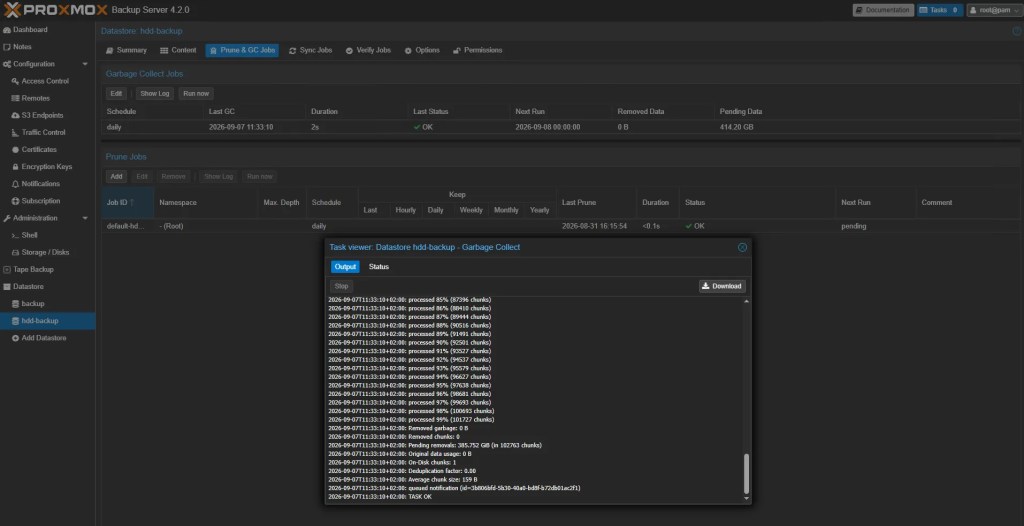
The GC log showed:
Removed garbage: 0 B
Removed chunks: 0
Pending removals: 68.841 GiB (in 20909 chunks)
The important part was:
Pending removals: 68.841 GiBSo PBS had already identified almost 69 GiB of chunks that were no longer needed, but they had not yet been physically removed from the datastore.
I checked the datastore:
proxmox-backup-manager garbage-collection status hdd-backupThe result confirmed the situation:
disk-bytes       39245206116
pending-bytes    73917058891
pending-chunks   20909
removed-bytes    0
removed-chunks   0
The PBS datastore itself was mounted at:
/hdd_backupand the filesystem showed:
/dev/sdb 458G 117G 318G 27% /hdd_backupHowever, I had another backup that I needed to run and wanted to recover the pending space immediately.
Why does this happen?
Proxmox Backup Server uses chunk-based storage and deduplication.
Deleting a backup does not simply mean deleting one large backup file. PBS needs to determine which chunks are still referenced by other backups.
During Garbage Collection, PBS identifies chunks that are no longer required.
However, those chunks are not necessarily deleted immediately.
The datastore was configured with:
gc-atime-cutoff=1445This means PBS uses an access-time cutoff of 1445 minutes before considering certain chunks safe for physical removal.
This is a safety mechanism that prevents PBS from prematurely deleting chunks that may still be required.
In my case, the result was:
Backup deleted
       ↓
Chunks no longer referenced
       ↓
Garbage Collection finds them
       ↓
Chunks become "Pending removals"
       ↓
Waiting for the GC access-time cutoff
       ↓
Chunks can finally be removed
Solution
First, I changed the datastore tuning:
Because I needed the disk space immediately, I temporarily reduced the GC access-time cutoff to 30 minutes.
proxmox-backup-manager datastore update hdd-backup --tuning 'gc-atime-cutoff=30'I then verified the configuration:
proxmox-backup-manager datastore show hdd-backupThe datastore showed:
tuning gc-atime-cutoff=30root@pbs:~# proxmox-backup-manager datastore show hdd-backup
┌───────────────────┬─────────────────────┐
│ Name │ Value │
╞═══════════════════╪═════════════════════╡
│ name │ hdd-backup │
├───────────────────┼─────────────────────┤
│ path │ /hdd_backup │
├───────────────────┼─────────────────────┤
│ comment │ │
├───────────────────┼─────────────────────┤
│ gc-schedule │ daily │
├───────────────────┼─────────────────────┤
│ notification-mode │ notification-system │
├───────────────────┼─────────────────────┤
│ tuning │ gc-atime-cutoff=30 │
└───────────────────┴─────────────────────┘I manually started Garbage Collection:
proxmox-backup-manager garbage-collection start hdd-backupThis time the result was completely different:
Removed garbage: 68.653 GiB
Removed chunks: 20860
Original data usage: 0 B
On-Disk chunks: 13808
Deduplication factor: 0.00
Average chunk size: 3.806 MiB
TASK OK
PBS successfully removed approximately 68.6 GiB of previously pending data.
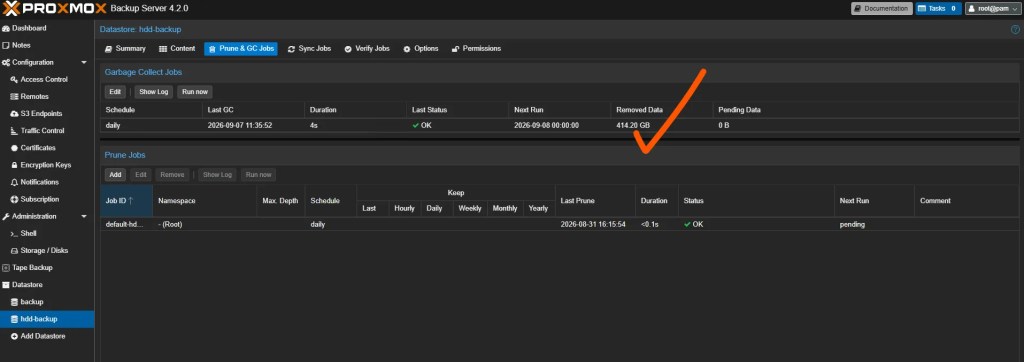
This was exactly the space I needed.
Restoring the original configuration
I did not want to leave the datastore permanently configured with a 30-minute cutoff.
The reduced value was only used temporarily to recover the space.
After the Garbage Collection completed, I restored the original setting:
proxmox-backup-manager datastore update hdd-backup --tuning 'gc-atime-cutoff=1445'Then I verified the configuration:
proxmox-backup-manager datastore show hdd-backupThe final configuration was:
name              hdd-backup
path              /hdd_backup
gc-schedule       daily
notification-mode notification-system
tuning            gc-atime-cutoff=1445
Everything was back to the original configuration.
Final result
The important lesson here is that deleting a backup from Proxmox Backup Server does not necessarily free the disk space immediately.
If PBS reports something like:
Pending removals: 68.841 GiBthe data has already been identified as removable, but PBS is waiting for the configured GC access-time cutoff before physically deleting the chunks.
In my case, I temporarily changed:
gc-atime-cutoff=1445to:
gc-atime-cutoff=30and manually ran Garbage Collection.
The result was:
Removed garbage: 68.653 GiB
Removed chunks: 20860
After recovering the space, I restored the original 1445-minute setting.
Do not manually delete PBS chunks from the filesystem. Let Proxmox Backup Server’s Garbage Collection handle the cleanup. The pending state is part of PBS’s protection mechanism and should normally be allowed to expire naturally.
If you’re interested in Proxmox, check out my other Proxmox-related articles where I share real-world problems, solutions, configurations, and lessons learned from managing my own infrastructure.


